
Zepo Messenger Application – Desktop Messaging Control for Windows Users
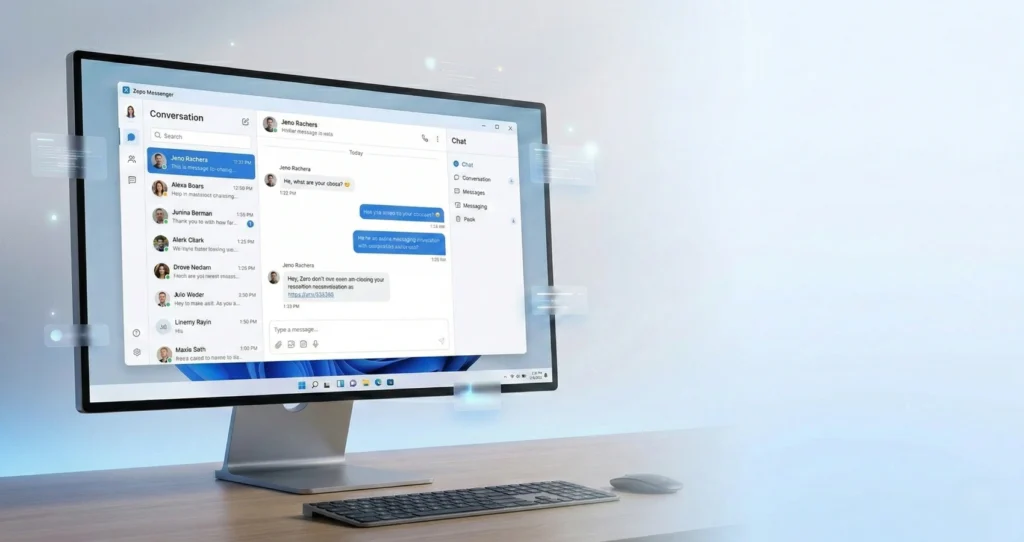
In today’s fast-moving digital environment, messaging has become central to daily communication. However, many users rely on browser-based platforms or background-running applications that consume system resources, affect performance, and raise privacy concerns. This is where Zepo Messenger Application – Desktop Messaging Control stands apart.
Zepo Messenger is a purpose-built Desktop Messaging Software for Windows that provides structured communication management from a single, secure interface. Unlike web-based chat tools, it operates only when launched by the user — offering complete transparency, stability, and privacy.
This blog explores how Zepo Messenger works, its key features, system requirements, and why it is an ideal solution for professionals and organizations seeking controlled desktop communication.
What Is Zepo Messenger?
Zepo Messenger is a Windows-based desktop messaging application designed to help users organize and manage conversations efficiently. It centralizes messaging activity into one clean, distraction-free workspace.
Unlike browser messaging platforms that rely on multiple tabs and internet sessions, Zepo Messenger offers:
Dedicated desktop communication control
Secure session-based operation
No background services
Optimized system performance
Structured conversation management
It is built specifically for users who value control, security, and operational clarity.
Why Desktop Messaging Software Matters
Many messaging tools operate in browsers or run silently in the background. While convenient, these systems often:
Consume RAM continuously
Run hidden background processes
Trigger unexpected notifications
Create privacy uncertainties
Slow down Windows performance
Zepo Messenger solves these issues by functioning strictly as an on-demand desktop application. When you close it, it stops completely — no hidden services, no background activity.
This design ensures:
Performance stability
Full user control
Transparent system behavior
Enhanced privacy management
How the Zepo Messenger Application Works in 3 Simple Steps
Step 1: Launch the Application
The session begins only when the user opens Zepo Messenger. There are no auto-start services or hidden background operations.
Step 2: Manage Conversations in a Structured Workspace
Users access a centralized desktop interface where conversations are clearly organized. The clean layout ensures focus and clarity.
Step 3: Close the Application to End Session
When the app is closed, all active processes stop. This guarantees controlled session handling and complete transparency.
Key Features of Zepo Messenger
1. Desktop Control
Zepo Messenger is engineered specifically for Windows desktop environments. It delivers:
Stable performance
Organized conversation structure
Clean workspace layout
Consistent session management
Unlike browser tabs that compete for resources, this desktop messaging software ensures a focused communication environment.
2. Clean Interface
The application features a distraction-free UI that removes unnecessary visual elements. Benefits include:
Clear message segmentation
Structured conversation display
Easy navigation
Reduced cognitive overload
A clean interface directly improves productivity and workflow consistency.
3. Secure Sessions
Security and transparency are core to Zepo Messenger’s architecture.
Sessions start only when launched
No hidden background services
Controlled access environment
Secure desktop usage
This session-based model ensures conversations remain active only during intentional use.
4.User Privacy
Privacy is one of the biggest concerns in modern communication tools. Zepo Messenger:
Does not install persistent background services
Does not run after closure
Maintains system transparency
Prevents hidden communication processes
This provides users peace of mind while working on sensitive tasks.
5. Efficient Workflow
The centralized interface supports structured communication management. Users can:
Organize ongoing conversations
Review communication history
Maintain clarity in daily tasks
Reduce distractions
This makes it ideal for professionals handling frequent desktop communication.
6. Stable Performance
Zepo Messenger is optimized for Windows systems, ensuring:
Low resource consumption
Smooth operation during active sessions
No unnecessary RAM usage
Performance consistency
The software is engineered to minimize system load while delivering reliable messaging control.
Supported System Specifications
Zepo Messenger is compatible with:
Windows 10 version 14316.0 or higher
x64 architecture systems
Standard keyboard and mouse input
PC desktop devices
This ensures compatibility across most modern Windows environments.
Desktop Messaging vs Browser Messaging
| Feature | Zepo Messenger (Desktop) | Browser Messaging |
|---|---|---|
| Runs Only When Opened | ✅ Yes | ❌ Often runs in background |
| System Transparency | ✅ Full control | ⚠ Limited visibility |
| Performance Stability | ✅ Optimized | ❌ Depends on browser load |
| Privacy Control | ✅ High | ⚠ Shared browser environment |
| Distraction-Free UI | ✅ Dedicated workspace | ❌ Multiple tabs & alerts |
Why Choose Zepo Messenger?
Zepo Messenger is not just another chat tool. It is a controlled desktop messaging system designed with:
Transparency
Performance optimization
Structured interface design
Windows-first architecture
Privacy-focused session handling
It eliminates the unpredictability of browser-based communication tools and replaces it with stability and clarity.
Final Thoughts: Download Zepo Messenger Today
This case study shows that AI is not limited to large enterprises or experimental use cases. When implemented with the right strategy, AI-powered digital solutions can help growing businesses scale faster, operate smarter, and remain competitive.
Zepoteq continues to help businesses turn AI into a growth driver — building intelligent systems that deliver real results, not just innovation headlines.Experience secure desktop messaging control by downloading Zepo Messenger from the Microsoft Store. Manage your conversations with performance stability, privacy assurance, and full desktop transparency.
Take control of your messaging workflow today.